Insights
See whether updates reach devices, launch, or crash, why updates fail, and what one device runs.
Insights answers the questions you have after shipping an update:
| Question | Where to look |
|---|---|
| Did devices download and launch it? | Release health → Adoption, and the Bundles list |
| Is it crashing? Should I roll it back? | Release health → Crashes |
| Why do updates fail? | Update failures |
| What does this user's device run? | All events → search an installation or user ID |
| How many devices use the app, on which versions? | App usage and Distribution |
The app's insights() client plugin sends reports, and the server's
insights() plugin stores and counts them. The numbers are reports
received, not your whole install base: a device that never reports, or runs
a debug build, is not counted.
Set up
Turn on the server plugin
The managed AWS, Cloudflare, Firebase, and Supabase servers already run
insights(). On a self-hosted server, add it to createHotUpdater and to
plugins in hot-updater.config.ts, then run hot-updater db migrate in the
server's project:
import { createHotUpdater } from "@hot-updater/server";
import { apiKeys, insights } from "@hot-updater/server/plugins";

export const hotUpdater = createHotUpdater({
  database,
  storage,
  plugins: [insights(), apiKeys()],
});
In hot-updater.config.ts, import insights from hot-updater/plugins and
add insights() to the existing server plugin list.
It accepts reports at POST /events and serves the Console's reads on the
admin handler. A server without it answers 404. The app then stops reporting
for the rest of that runtime. A later runtime can report once 24 hours have
passed since the 404.
Add the client plugin
Add insights() to plugins in HotUpdater.init.
It reports to the baseURL with the headers you already pass:
import { HotUpdater, insights } from "@hot-updater/react-native";

export const hotUpdater = HotUpdater.init({
  baseURL: "<your-update-server-url>",
  requestHeaders: { "x-api-key": "<client-api-key>" },
  plugins: [insights()],
});- Debug builds report nothing unless you pass
insights({ debug: true }), so development stays out of production numbers. - To find a user's device later, attach your user ID at sign-in with
hotUpdater.insights.setUser({ userId }), and clear it withsetUser(null)at sign-out. Reports then carry that ID, so choose one that fits your data policy; see Security. - Reporting never delays startup or an update, and never triggers a rollback.
Verify reporting
- Launch a release build (or a debug build with
insights({ debug: true })) and note itshotUpdater.getInstallId(). - In the Console, open Insights → All events, search that installation ID, and open it. Its latest report shows the app version, channel, and platform.
- Deploy and apply a test update. After the app restarts into it, the installation shows a Launched event.
A device reports a plain launch once per UTC day, so relaunching the same build
sends nothing new; look the installation up by ID instead of waiting. A bundle
ID in the app is not proof either: getBundleId()
can name a staged bundle before it runs, so confirm the visible change and the
Launched event.
No report? Check that the app passes insights() to init, the server
runs insights(), and the baseURL and client key match the server. After a
404, restart the app once 24 hours have passed to resume reporting, or
reinstall it to test right away.
Read the Console
Open Insights in the Console. It shows Insights
when its configuration lists insights() in plugins. Over
standaloneRepository it reads the overview, events, installations, update
failures, and retention from the server's admin handler; App usage,
Release health, and bundle activity need the server's database as
database.
Choose a Channel, a platform, and a period (24h, 7d, or 30d), and optionally a Release ID to focus on one release. Periods end with the current UTC hour. Numbers marked ≈ are estimates, typically within 3%; report counts are exact.
Bundles list
Each bundle shows lifetime Downloaded, Launched, and Crashed, counting each installation once:
- Downloaded: got the bundle.
- Launched: ran it.
- Crashed: crashed on it and rolled back to the bundle before.
Once every installation has restarted, Downloaded equals Launched plus Crashed; the difference is downloads waiting for a restart or passed over for a newer bundle. View adoption opens Release health on the release and the one before it.
Release health
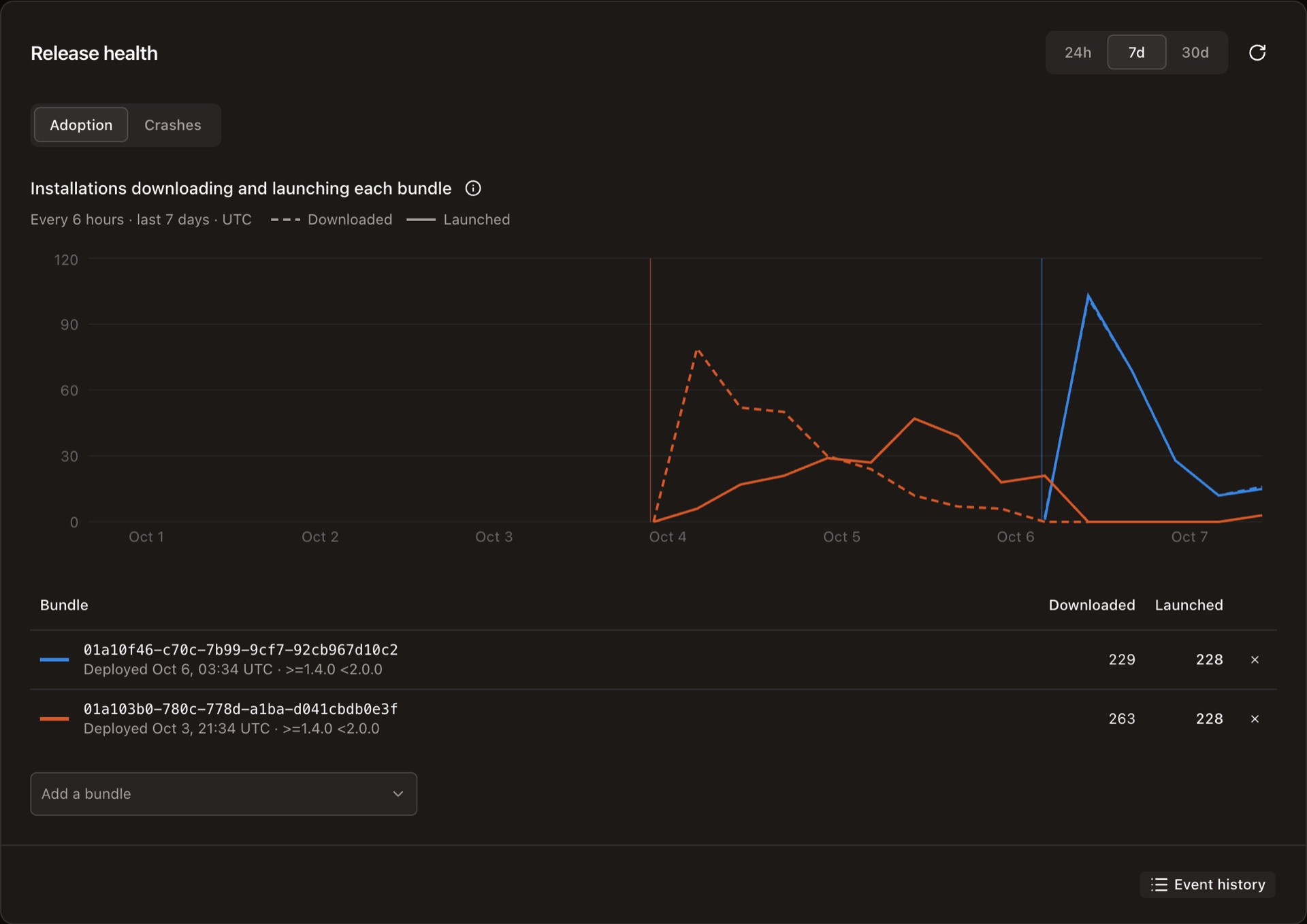
Release health follows the newest bundle deployments on a timeline, up to four at a time; Add a bundle compares another.
- Adoption draws each bundle's downloads (dashed) and launches (solid) per interval. Launches follow downloads as apps restart; after a forced update the lines nearly meet. When a new bundle ships, its lines rise and the one it replaced stops being launched.
- Crashes counts launches that crashed and recovered to the bundle before. Crash rate is crashed divided by launched plus crashed. Once at least 20 installations tried a bundle and 5% crashed, Release health recommends Roll back, which disables the release so devices return to the previous bundle at their next update check.
Insights counts crashes but keeps no crash reports. To see why a launch crashed, use a crash reporter with an integration plugin.
Update failures
An update check, download, or install that fails sends a report with its
stage (check, download, install) and reason (network, http,
invalid_response, hash_mismatch, signature, patch, extract,
storage, or unknown), plus the HTTP status, storage error code, network
failure, error message, and stack when known.
- Downloads & installs is the share of update attempts that failed: failures divided by failures plus downloads.
- Update checks, for a whole channel, is the share of active installations with a failed check. A check that failed because the device was offline is not reported.
- Each rate shows its change from the previous period.
- Failures by stage and reason breaks them down; expand one for HTTP statuses, error codes, and resources.
- Errors to investigate groups reports by their original message. Open one for its stack, app and SDK versions, the latest server response the device saw, and the installation's history; Copy report shares it.
A device reports each kind of failure at most once per UTC day, so the counts are not every retry or exception thrown. A failure doesn't change what an installation runs, so it never counts as a launch.
App usage and Distribution
App usage shows DAU, WAU, MAU, or YAU for the period: unique installations that reported at least once, with a chart per interval. The period total is not the sum of the chart points, since an installation counts once.
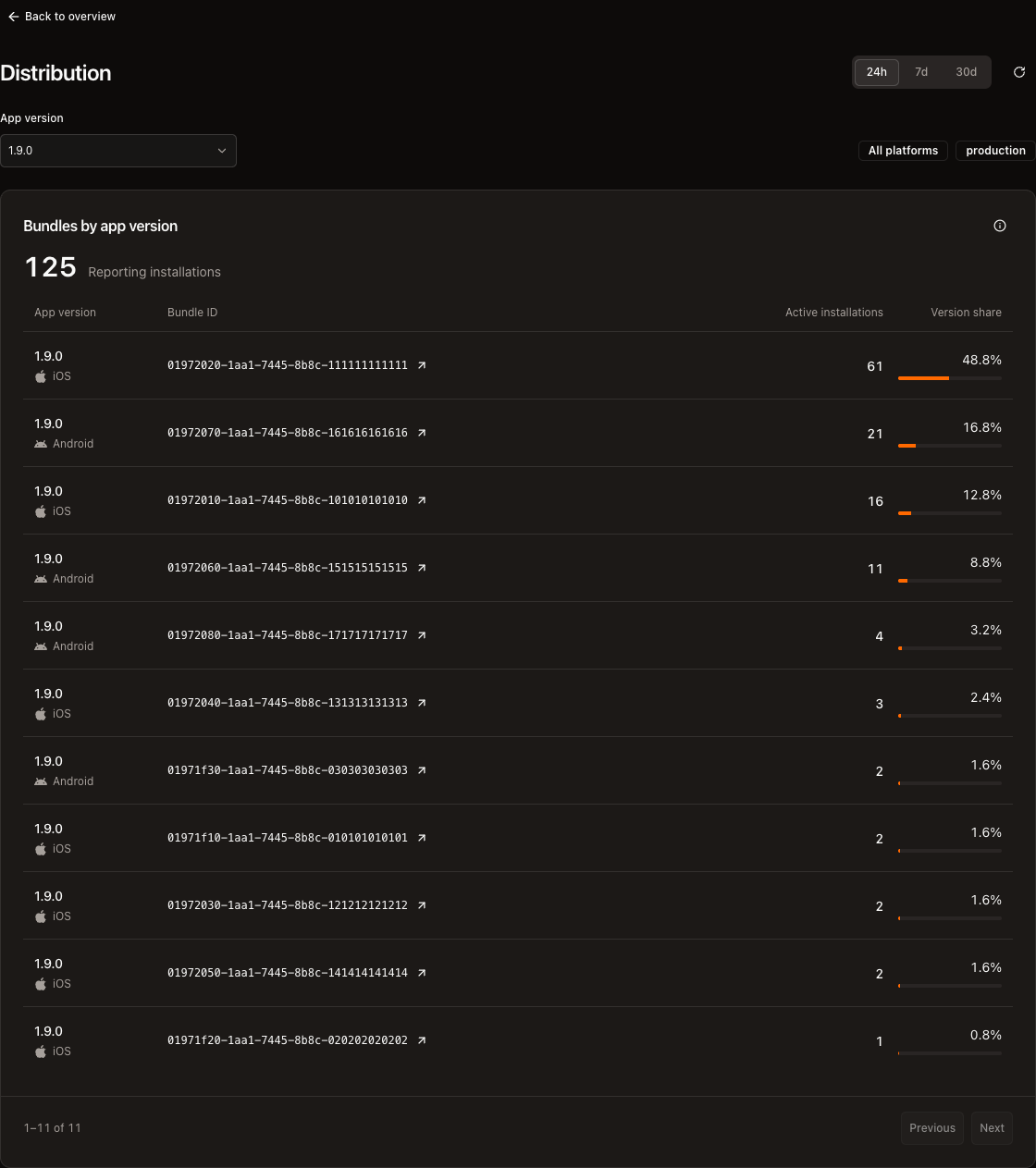
Distribution shows which bundles each app version runs, by each installation's latest report. Built-in bundle is the bundle a native build shipped with; Unknown bundle is installations that never reported a deployed bundle.
Events and installations
All events lists downloads, launches of a new bundle, crashes, update failures, and changes such as a first report or a new app version, newest first, over up to 90 days. A launch that changes nothing isn't listed; it counts in App usage and shows as the installation's latest report.
Search by user ID or installation ID to open an installation: its latest report, what it runs, and its history. Several installations of one user stay separate.
Read from the CLI
hot-updater insights reads the same numbers from a terminal, CI, or an
agent, on the server hot-updater api-key
finds: database and plugins in hot-updater.config.ts, the admin handler
through standaloneRepository, or the server file you pass last.
# How is this bundle doing?
npx hot-updater insights overview --bundle <id>
npx hot-updater insights failures --bundle <id> --window 7d

# Which installations crashed on it?
npx hot-updater insights events --bundle <id> --outcome crashed

# What does this user's device run?
npx hot-updater insights installations <install-or-user-id>
npx hot-updater insights events --install <install-id>
--bundle takes the ID shown in the Console or by getBundleId(); without it,
pass -p <platform> -c <channel>. --window is 24h (default), 7d, or
30d. Every command takes --json, for example to gate a rollout in CI on
the failure rate. App usage and Release health charts stay in the Console.
What the app reports
| Report | When | Console |
|---|---|---|
UNCHANGED | The app launched, or a check found nothing to install. | Launch, or the change it made |
UPDATE_DOWNLOADED | A bundle was downloaded, verified, and staged. The app runs the old bundle until it restarts. | Downloaded |
UPDATE_APPLIED | The app restarted into the new bundle. | Launched |
RECOVERED | The app crashed on the new bundle and rolled back. | Crashed |
UPDATE_FAILED | An update check, download, or install failed. | Update failed |
- A plain launch is reported at most once per UTC day, unless the channel, app version, bundle, Release, or user changed. Downloads, launches of a new bundle, and crashes are always reported.
- Failed reports are retried in the background with the same ID, so the server counts each once.
- A launch report that changes what an installation runs is kept as an event:
First seen, App updated, Launched (another bundle without an
UPDATE_APPLIEDreport), Release adopted, or Channel changed.
The plugin reference has the exact rules and the report format.
How long Insights keeps data
| Data | Kept by default |
|---|---|
| Raw events, hourly totals, and the failure breakdown | 90 days |
| Daily totals and distributions | 13 months (400 days) |
| An installation's latest report | 13 months after it last reports |
| Lifetime counts per release (Bundles list) | Forever |
On a self-hosted server, change the periods on the plugin, in both the server's
createHotUpdater and hot-updater.config.ts, so the CLI prunes as the
server does:
insights({ retention: { rawDays: 30, dailyDays: 400 } });Both are whole days, at least 1, with dailyDays at least rawDays. On
DynamoDB, Firestore, and MongoDB, rows already written keep the expiry they
were written with. Managed servers use the defaults; keep plugins in their
config as init wrote it.
Expired data leaves without a scheduler: DynamoDB, Firestore, and MongoDB
delete it with their TTL features (which hot-updater db migrate or the
managed setup turns on), and SQL databases, D1, and Supabase delete up to 500
expired rows a table during writes, hourly. A Console view that reaches past
what is kept shows Partial history.
What Insights writes
Most reports are launches, and a device sends at most one plain launch per UTC
day. Each report the server records is one transaction. On DynamoDB, without
batching (aggregateBatching: false), an installation costs about:
| Report | Write request units (WRU) |
|---|---|
| First launch of a UTC day | 36 |
| Another launch the same day, same bundle | 0 |
UPDATE_DOWNLOADED | 40 |
UPDATE_APPLIED | 42 |
RECOVERED | 56 |
UPDATE_FAILED (download or install / check) | 34 / 20 |
A launch on another bundle, without UPDATE_APPLIED | 58 |
So 10,000 devices that open the app every day cost about 360,000 WRU a day.
DynamoDB and Firestore batch totals by default, which cuts a report to
about 8 WRU at 10 or more reports per second; a long-lived server can keep
totals in memory with aggregateBatching: { mode: "memory" } (about 5 WRU, and
call hotUpdater.flush() before the process exits). See
DynamoDB and
Firestore. The
managed AWS table caps writes at 100 WRU per second, about 12 reports per
second with batching; a throttled report answers 503, and the app sends it
again.
Server reference
How the server accepts reports
POST /events takes one report of at most 16 KB. Unknown fields are ignored,
so a newer SDK's report still records on an older server.
| Status | Meaning |
|---|---|
204 | Recorded, or already recorded under the same eventId |
400 | A missing or invalid field |
413 | The body is larger than 16 KB |
503 | The database is busy; retry after Retry-After seconds |
Admin routes and API
The admin handler serves the Console's reads: GET /overview, GET /events
(at most 90 days per request), GET /installations/:id and its /events,
GET /installations?userId=, GET /failures, and GET /retention.
GET /failures?platform=ios&channel=production&releaseId=<id> answers a
release's failures since its first report; add start and end in epoch
milliseconds, at most 30 days apart, which a channel without releaseId
needs. Server code reads the same through hotUpdater.api.insights, such as
getUpdateFailures(input).